What Is Least Privilege & How It Protects Capital
June 4, 2026
Email Encryption 101: Keep Messages Private
June 7, 2026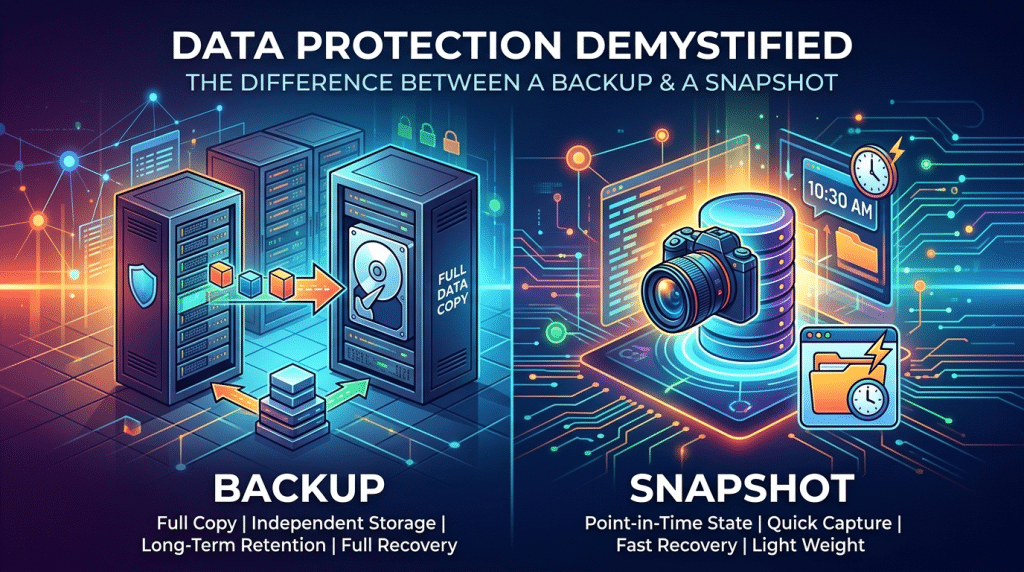
Data Protection Demystified: The Difference Between a Backup and a Snapshot
When business owners and corporate executives discuss disaster recovery, two technical terms are frequently used interchangeably: Backups and Snapshots. To the untrained eye, they appear to accomplish the exact same goal—capturing a copy of your company’s data so you can recover it if something goes wrong. Consequently, many leaders look at their IT reports, see that “snapshots are running successfully,” and assume their organization is completely protected against a catastrophic data event.
As we navigate the business landscape of 2026, relying on that misunderstanding is one of the most dangerous risks an enterprise can carry.
A snapshot is not a backup. They are fundamentally different technologies engineered for completely distinct operational purposes. Treating a snapshot as a backup leaves your business exposed to total data erasure, severe operational downtime, and backup-recovery failures. To guarantee true business continuity, you must understand how these two tools operate and why the distinction matters to your bottom line.
What Is a Snapshot? The Digital Bookmark
To understand a snapshot, think of it as a virtual bookmark or a photograph of your server at a precise microsecond in time.
When your storage system takes a snapshot, it does not create a duplicate copy of your files, databases, or operating system. Instead, it freezes the existing file system layout and creates a read-only metadata index of the drive’s exact structure at that moment. Moving forward, any new data or modifications are written to a separate, adjacent block of storage.
Because a snapshot only records the changes made after the point of origin, it offers two immense operational advantages:
- Instantaneous Execution: Creating a snapshot takes seconds, regardless of whether your server holds ten gigabytes or ten terabytes of data.
- Minimal Storage Footprint: Because it doesn’t duplicate existing files, it consumes negligible storage space on your drive.
Snapshots are the ultimate tool for short-term version control. If an engineer is about to push a major software update or patch a critical line-of-business application, they will trigger a snapshot first. If the update fails or corrupts the system, the technician can “roll back” the server to the pristine snapshot state in minutes, entirely erasing the error.
The Fatal Flaw of the Snapshot
While snapshots are highly efficient, they possess a critical structural vulnerability: They are completely dependent on the parent system.
Because a snapshot lives on the exact same physical hard drive array and storage controller as your live operations, it offers zero protection against hardware failure. If your server chassis suffers a fatal electrical surge, if the local storage array degrades, or if physical disaster (like an office flood) hits the server room, your live data and your snapshots vanish simultaneously.
Furthermore, snapshots do not protect against sophisticated modern ransomware. Many advanced malware strains are explicitly engineered to search for local snapshots on the hosting infrastructure and delete them before initiating network encryption, leaving your local recovery options entirely useless.
What Is a Backup? The Independent Fortress
A backup is a completely independent, self-contained duplicate of your entire digital ecosystem. Unlike a snapshot, a true backup detaches your data from the parent hardware and infrastructure entirely.
When an automated backup cycle runs, it reads your files, operating systems, configurations, and metadata, compresses the information, and writes a standalone clone to a completely separate storage architecture. To meet the baseline standard of modern data protection, a backup must follow the strict 3-2-1 Rule:
- Maintain at least three (3) copies of your data.
- Store those copies on two (2) different types of media (e.g., local network attached storage and cloud vaults).
- Keep at least one (1) copy completely off-site and air-gapped.
If your primary server experiences a total hardware meltdown, an independent backup ensures your data remains completely safe. Your IT partner can pull that pristine backup file and restore your entire operational footprint onto completely new hardware, a local standby machine, or a secure cloud-native data center.
How They Collaborate to Guarantee Continuity
True operational resilience does not require choosing between a snapshot and a backup. Instead, it relies on systemizing both tools into a unified, high-availability disaster recovery framework.
At Krypto IT, we build this multi-layered safety net for businesses by aligning execution speeds with long-term retention goals:
- The Rapid Triage Layer (Snapshots): We configure local storage arrays to take automated snapshots throughout the productive work day (e.g., every two hours). This provides your team with immediate protection against accidental file deletions, minor software glitches, or rapid file corrupts without interrupting daily performance.
- The Immutable Vault Layer (Backups): Every night, our automation engines package those operational baselines into comprehensive, standalone backups. These files are encrypted and replicated immediately to an out-of-region, air-gapped cloud infrastructure. These backups are formatted as immutable snapshots, meaning that once written, the files cannot be altered, overwritten, or deleted by anyone—including administrative users or ransomware strains—for a set retention window.
Conclusion: Know Your Safety Net
In the modern digital economy, data availability is the lifeblood of your firm’s reputation and survival. Confusing a fast, dependent snapshot with a robust, independent backup is a structural blind spot that can result in permanent data loss during a crisis. By deploying snapshots for agile version control and backing them up with a systemized, multi-generational backup architecture, you ensure that your business remains entirely bulletproof against any disruption.
Are you certain your data is backed up, or are you just relying on local snapshots? Contact Krypto IT today for a comprehensive “Disaster Recovery and Data Integrity Audit” and let’s secure your digital vault.