Software Supply Chain Attacks: When Apps Get Hijacked
August 18, 2026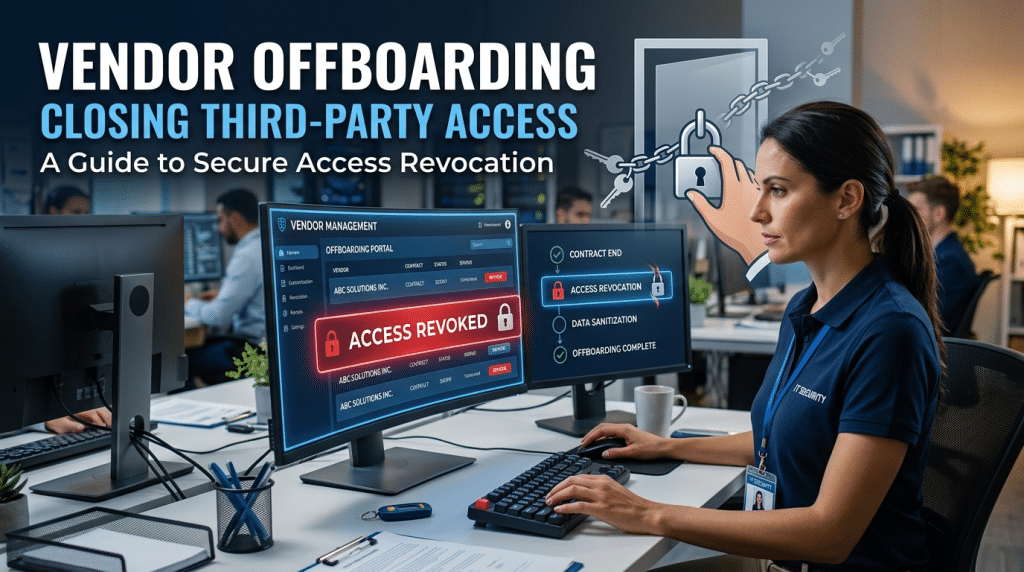
How to Create a Vendor Offboarding Checklist That Closes Third-Party Access
When organizations end a contract with a third-party vendor, software contractor, or outsourced service provider, the process usually centers on business logistics: settling final invoices, issuing formal termination notices, and wrapping up remaining project handoffs.
However, the most critical phase of ending a vendor relationship is often overlooked: revoking technical access.
During an active engagement, suppliers are routinely granted wide-ranging access to corporate resources. They receive dedicated software accounts, VPN credentials, cloud workspace permissions, API integration keys, and shared drive access. When that contract ends, forgotten accounts and lingering access tokens transform into dangerous security blind spots known as “orphan accounts.”
If left open, these abandoned entry points give terminated contractors unauthorized visibility into company data and provide automated cyber botnets with easy footholds into your network. A structured technical vendor offboarding checklist ensures no third-party backdoor stays open.
Step 1: Revoke Identity, User Accounts, and Active Sessions
The first priority during vendor offboarding is terminating all user-level identities and active authentication tokens across every connected platform.
- Single Sign-On (SSO) and Directory Accounts: Immediately disable contractor identity accounts within Microsoft Entra ID, Google Workspace, or your central identity provider. Disabling the account prevents future logins while preserving audit logs for compliance tracking.
- Revoke Active Cloud Sessions: Simply disabling a user account does not always terminate active browser sessions. Force a manual global sign-out across all cloud sessions to immediately kill cached tokens on remote vendor devices.
- Audit Non-SSO Standalone Platforms: Review separate SaaS applications, accounting suites, project management boards, and specialized portals that do not route through central SSO to ensure vendor profiles are permanently deactivated.
Step 2: Invalidate APIs, Service Keys, and Shared Secrets
Third-party integrations often operate behind the scenes through machine-to-machine connections, which can remain active long after human user accounts have been closed.
- Rotate and Revoke API Keys: Identify any API keys, webhook endpoints, or tokens provisioned for the vendor’s software. Revoke these keys at the source to cut automated communication.
- Rotate Shared Administrative Credentials: If the vendor had temporary access to shared administrative passwords, local server root logins, or database connection strings, update and rotate every single password immediately.
- De-authorize Third-Party OAuth App Permissions: Audit your cloud directory’s connected application registry and remove third-party enterprise app authorizations granted during the project.
Step 3: Remove Remote Access and Inbound Network Rules
Vendors performing infrastructure support or technical development often require direct network access. Leaving these channels open creates severe vulnerabilities.
- Audit Firewall and Port-Forwarding Rules: Inspect perimeter firewalls to identify and delete any custom port-forwarding rules, whitelisted public IP ranges, or inbound firewall policies created specifically for vendor connectivity.
- Revoke VPN and Remote Desktop Access: Disable vendor-specific VPN tunnels, Remote Desktop Protocol (RDP) channels, and remote monitoring and management (RMM) agent permissions.
- Remove Remote Access Software: Verify that unmanaged remote access software—such as TeamViewer, AnyDesk, or LogMeIn—installed during troubleshooting has been completely uninstalled from local workstations and servers.
Step 4: Secure Data Assets and Verify Data Destruction
Ending a vendor relationship requires confirming that proprietary corporate data is either safely returned or permanently destroyed.
- Revoke Shared Cloud Repositories: Remove vendor access from Microsoft SharePoint libraries, OneDrive shares, Google Drive folders, and Dropbox workspaces.
- Secure Code and Documentation Repositories: Disconnect contractor accounts and revoke commit privileges in GitHub, GitLab, Bitbucket, and internal technical knowledge bases.
- Obtain Written Proof of Data Destruction: Require the vendor to provide a formal, signed Certificate of Data Destruction confirming that all local backups, cached databases, and proprietary company files have been permanently sanitized according to industry standards.
Step 5: Conduct a Final Technical Audit and Log Archival
Before marking offboarding as complete, perform a closing verification audit:
- Review Access Logs: Inspect authentication logs 48 hours post-offboarding to confirm that no automated services or former contractor accounts are still attempting network connections.
- Archive Audit Trails: Retain timestamped offboarding records and signed documentation to satisfy regulatory compliance and cyber insurance verification requirements.
Secure Your Vendor Ecosystem with Krypto IT
Managing third-party lifecycle access is essential for maintaining strong digital defenses and avoiding supply chain breaches.
At Krypto IT, we help Houston businesses implement automated identity governance, strict Zero-Trust boundaries, and comprehensive vendor offboarding workflows that protect corporate networks from third-party vulnerabilities.
Are leftover vendor accounts creating security risks in your environment? Contact Krypto IT today to schedule a comprehensive access and network security review.