The Invisible Threat: How Infostealers Hide in Your Network
January 9, 2026
Is Your Vendor a Security Risk? Protecting Your Houston Business from Supply Chain Attacks
January 12, 2026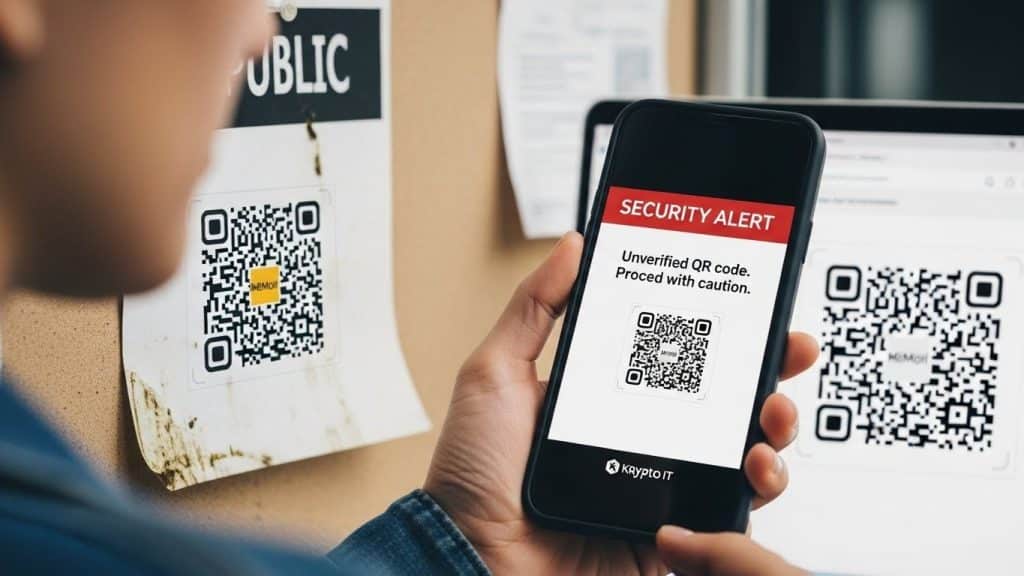
By the Team at Krypto IT | Cybersecurity Experts Serving Houston SMBs
In the last few years, QR codes have gone from a tech novelty to an essential part of our daily lives. Whether you’re scanning a menu at a restaurant in the Heights, paying for parking in Downtown Houston, or checking into a conference at the George R. Brown Convention Center, QR codes are the ultimate tool for convenience.
However, in the world of cybersecurity, “convenience” is often the cousin of “vulnerability.”
As we move through 2026, a new threat has emerged that most Houston business owners and employees simply aren’t prepared for: Quishing (QR Phishing). At Krypto IT, we are seeing a significant rise in this tactic because it exploits a massive blind spot in traditional security software. Here is everything you need to know to protect your team from this “invisible” link.
What is Quishing?
“Quishing” is a social engineering attack where a cybercriminal replaces a legitimate QR code with a malicious one, or sends a malicious QR code via email or text. When a victim scans the code with their smartphone, they are directed to a fraudulent website designed to steal credentials, install “Quiet” Infostealer malware, or initiate a fraudulent payment.
The genius of Quishing lies in its ability to bypass your company’s “Digital Front Door.”
1. The “Security Filter” Blind Spot
Most modern Houston businesses have some form of email security that scans incoming messages for malicious links or attachments. These filters are very good at reading text and analyzing URLs.
However, many of these filters see a QR code as just an image—like a logo or a photo. They don’t always “look” inside the image to see where the encoded link is going. By hiding a malicious URL inside a QR code, hackers can successfully deliver a phishing link directly to an employee’s inbox that would have otherwise been blocked if it were sent as plain text.
2. The “Air-Gap” Attack
One of the most dangerous aspects of Quishing is that it moves the attack from a protected device to an unprotected one.
When an employee opens a phishing email on their work computer, they are often protected by the company’s Managed EDR and DNS filtering. But when they see a QR code in that email and pick up their personal smartphone to scan it, they have just moved the attack to a device that likely has zero corporate security monitoring.
The hacker has successfully “jumped” from your secure network to an unmanaged personal device, where they can easily steal Microsoft 365 credentials or capture session cookies to bypass Multi-Factor Authentication (MFA).
3. Real-World Houston Scenarios
Quishing isn’t just happening in your inbox; it’s happening on the streets of Houston. We are seeing several common “Physical Quishing” scenarios:
- The Parking Meter Scam: Hackers place stickers with malicious QR codes over the legitimate payment codes on parking meters in Midtown or the Medical Center. Users think they are paying for parking, but they are actually handing their credit card info to a criminal.
- The Counterfeit Menu: In busy restaurants, a hacker might swap out the “Scan for Menu” cards on the tables. When a professional on a lunch break scans the code, their phone is hit with a drive-by download of malware.
- The Fraudulent “Action Required” Notice: An employee receives a letter or an email that looks like it’s from a government agency or a bank, featuring a large QR code and a message saying: “Scan here to verify your identity or your account will be suspended.”
4. Why MFA Isn’t Always the Answer
Many business owners believe that because they have MFA (Multi-Factor Authentication) enabled, they are safe. Unfortunately, Quishing sites are often “Adversary-in-the-Middle” (AiTM) proxies.
When you scan the code and enter your credentials, the fake site passes those credentials to the real login page in real-time. When the real site sends you an MFA code, you enter it into the fake site, and the hacker captures that too. They are “in” before you even realize the site was a fake.
How Krypto IT Defends Your Team
At Krypto IT, we believe that the best defense against Quishing is a combination of advanced technology and a “Human Firewall.”
- Managed Mobile Security: We can help you implement security protocols on mobile devices used for work, ensuring that even if an employee scans a bad code, the malicious site is blocked at the browser level.
- Next-Gen Email Security: We deploy tools that specifically use computer vision to “scan” images within emails for embedded QR codes, analyzing the destination before the email ever reaches the user.
- Security Awareness Training: We provide Houston-specific training modules that teach your employees to “Inspect before they Connect.” We teach them to look for stickers over QR codes and to never scan a code in an email that asks for login credentials.
- Policy Implementation: We help you create “Standard Operating Procedures” where sensitive actions—like changing a password or authorizing a payment—are never initiated via a QR code.
Conclusion: Don’t Let Convenience Be Your Downfall
QR codes are a great tool, but they require a new level of digital hygiene. In 2026, “Think before you click” has evolved into “Verify before you scan.”
Krypto IT is dedicated to keeping Houston’s business community safe from every angle—whether the threat comes through a wire or through a camera lens.
Are your employees “Quish-Proof”? Contact Krypto IT today for a Security Awareness Consultation and let’s make sure your team knows how to spot the scam.