Shared Mailbox Security: The Small Business Blindspot
July 18, 2026
Managing Guest Access in Teams & Slack
July 21, 2026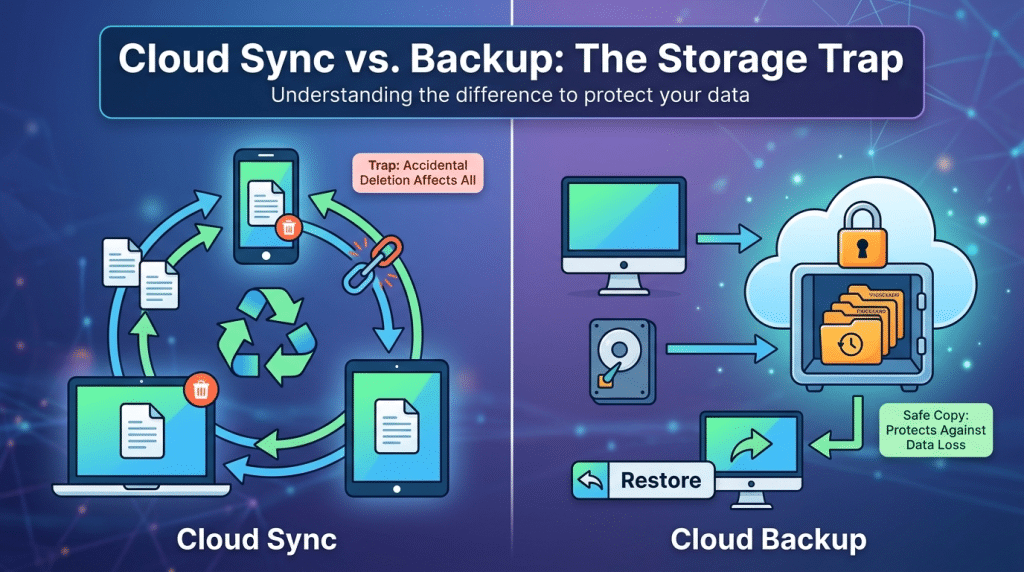
OneDrive and Google Drive: Why Cloud Storage Is Not an Automated Backup System
In modern business, convenience often masks vulnerability. As companies shift toward hybrid work environments, platforms like Microsoft OneDrive and Google Drive have become essential daily tools. They allow employees to collaborate on documents in real time, access files from anywhere, and keep millions of documents instantly available in the cloud.
Because files are stored off-site and automatically synced, many business leaders operate under a dangerous assumption: they believe using cloud storage means their data is automatically backed up.
This misunderstanding is one of the most common and expensive IT mistakes small and medium-sized businesses make today. While cloud storage and automated cloud backup sound similar on the surface, they serve entirely different purposes. Relying on OneDrive or Google Drive as a complete disaster recovery plan leaves your corporate data exposed to ransomware, accidental deletion, and catastrophic file corruption.
Syncing Is Not the Same as Backing Up
To understand why cloud storage falls short as a protective safety net, you have to look at the mechanics of file synchronization versus true data backup.
Cloud storage platforms like OneDrive and Google Drive are engineered for active synchronization and immediate accessibility. When you edit, add, or delete a file on your local machine, the cloud platform mirrors that exact action across every connected device almost instantaneously. If a file is updated on your desktop, it updates in the cloud.
A true automated backup system, by contrast, creates isolated, point-in-time snapshots of your data that exist independently of your active file environment. Backup systems are built for long-term retention, historical recovery, and complete business continuity.
When you rely solely on synchronization, whatever happens to your local files immediately happens to your cloud files. Syncing simply propagates changes—both good and bad—at high speed across your entire network.
The Core Vulnerabilities of Cloud Syncing
Relying exclusively on file synchronization leaves critical operational gaps that cybercriminals and simple human error can easily exploit.
1. The Instant Replication of Ransomware
Ransomware works by systematically encrypting files on a local machine and demanding a ransom for the decryption key. If a user’s laptop is infected with ransomware and that device is linked to a cloud sync directory, the cloud service sees those encrypted files as normal updates.
Within seconds, OneDrive or Google Drive will sync the newly corrupted, unreadable files straight to the cloud, overwriting the clean versions. Even worse, if those folders are shared across a team, the encrypted files will sync down to your colleagues’ computers as well, spreading the damage across your entire workforce.
2. Accidental Deletion and Malicious Insiders
Cloud drives feature basic recovery mechanisms, like a recycle bin or basic version history, but these are temporary and easily bypassed. If an employee accidentally deletes a critical project folder—or if a disgruntled departing staff member deliberately wipes clean their entire drive—that deletion instantly syncs to the cloud.
Once the recycle bin is emptied or the limited retention period expires (often 30 to 90 days depending on your subscription tier), those files are gone forever. Standard cloud storage lacks the immutable, permanent archiving necessary to protect against intentional internal destruction or delayed discovery of missing files.
3. The Shared Responsibility Model
Major cloud providers are open about their security boundaries, even if customers routinely ignore the fine print. Microsoft and Google operate under a “Shared Responsibility Model.”
Their job is to maintain system uptime, infrastructure availability, and hardware reliability. Your job is to protect the actual data, account access, and user activity inside that cloud environment. If Microsoft’s servers experience hardware failure, they have redundancy to keep the service running. But if your files are deleted, overwritten, or corrupted by malware, the provider considers that a user-side issue outside their core operational liability.
Building a True Business Continuity Strategy
Protecting your company’s intellectual property and financial records requires a dedicated, multi-layered data protection architecture that separates live sync environments from your security recovery infrastructure.
At Krypto IT, we help businesses eliminate data loss risks by implementing comprehensive, automated backup solutions that operate outside standard cloud drives:
- Immutable Offline and Air-Gapped Backups: We ensure your critical data snapshots are stored in write-once, read-many (WORM) storage environments that cannot be altered, overwritten, or encrypted by ransomware—even if an administrator account is compromised.
- Independent Third-Party Cloud Backup: We deploy automated, cloud-to-cloud backup systems that continuously archive your Microsoft 365 or Google Workspace tenant data. This creates isolated, historical restore points completely independent of your primary cloud vendor.
- Rapid Disaster Recovery and Rollbacks: When disaster strikes, businesses cannot afford days of manual file reconstruction. Our disaster recovery frameworks allow granular, point-in-time rollbacks, enabling your team to restore single files or entire server states with minimal downtime.
Conclusion: Don’t Confuse Storage with Safety
OneDrive and Google Drive are outstanding tools for everyday productivity, real-time collaboration, and remote flexibility. However, treating a synchronization tool as an automated backup system creates a false sense of security that can prove fatal to your operations.
Real business protection requires dedicated, independent, and immutable backup systems designed specifically to survive cyberattacks and human error.
Is your critical corporate data protected by true automated backups, or are you relying on sync tools to save the day? Contact Krypto IT today for a Data Resiliency Audit, and let’s ensure your business is fully protected against catastrophic loss.