Anatomy of a Near-Miss: EDR Ransomware Defense
August 7, 2026
The $50,000 Email: Wire Transfer Fraud Lessons
August 9, 2026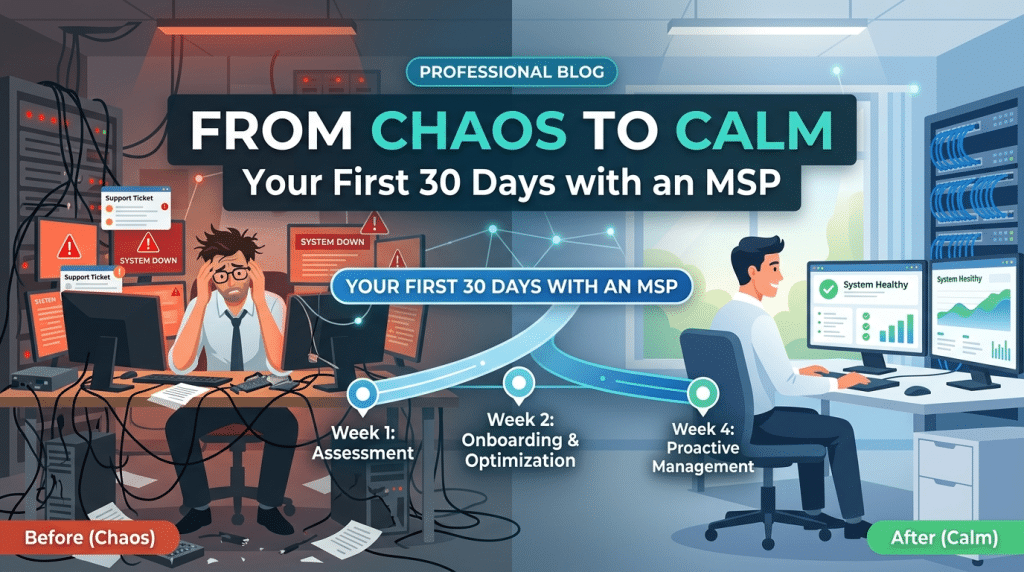
From Chaos to Calm: A Small Business’s First 30 Days with a Managed Service Provider
For many small and mid-sized businesses, managing IT internally feels like an endless cycle of fire-drills. Password resets disrupt important client calls, unpatched software creates security gaps, unexpected server crashes paralyze day-to-day operations, and strategic technology planning gets pushed to the back burner. Technology, which should be driving growth and efficiency, becomes a constant source of stress.
Deciding to partner with a Managed Service Provider (MSP) is a transformative step toward taking back control of your business operations. However, transitioning your technical infrastructure to an outside team can feel overwhelming. What actually happens when you sign on with an MSP?
Understanding the onboarding journey helps set expectations and ensures a smooth shift. Here is what the first 30 days look like as your technology shifts from unpredictable chaos to structured calm.
Week 1: Discovery, Auditing, and Immediate Stabilization
The onboarding process begins not with drastic overhauls, but with listening, observation, and thorough documentation. During the first seven days, your new MSP focuses on mapping your existing digital footprint and stabilizing immediate vulnerabilities.
Deep Infrastructure Assessment
Engineers conduct a comprehensive audit across all workstations, physical servers, network switches, routers, and cloud environments. They catalogue hardware assets, document operating system versions, map out software licenses, and identify end-of-life equipment that poses a security risk.
Triage and Emergency Stabilization
If your business joined the MSP during an active crisis—such as an ongoing email deliverability issue, active malware infection, or failing server—the primary focus is immediate stabilization. Critical patches are applied, firewall configurations are verified, and emergency backups are verified before broader changes occur.
Centralized Documentation
The MSP creates a secure, centralized documentation vault detailing network topology, admin credentials, vendor contacts, and ISP circuit details. This eliminates single points of failure where critical system knowledge lived solely in one employee’s head.
Week 2: Deploying Modern Security and Management Tools
With the initial landscape fully documented, Week 2 shifts toward installing the core management and security software stack across all endpoints.
Installing Centralized Agents
Silent deployment packages install Remote Monitoring and Management (RMM) software and Endpoint Detection and Response (EDR) agents across every laptop, desktop, and server. These agents give the MSP real-time visibility into system health, performance bottlenecks, disk storage capacity, and security events.
Standardizing Endpoint Security
Outdated consumer antivirus software is removed and replaced with enterprise-grade threat protection. Centralized patch management schedules are configured to ensure operating system and third-party software updates occur automatically during non-business hours, eliminating intrusive reboot prompts during the workday.
Establishing the Service Desk Connection
Employees receive direct access to the MSP help desk through a branded desktop application, dedicated phone line, or email ticketing portal. Standard operating procedures are established so your staff knows exactly how to submit requests and what response times to expect.
Week 3: Securing Identities and Refining Workflows
Week 3 targets identity management and data protection—the two areas most vulnerable to external cyber threats and internal operational mistakes.
Implementing Multi-Factor Authentication (MFA)
Password-only protection is eliminated. The MSP enforces multi-factor authentication across core productivity suites (such as Microsoft 365 or Google Workspace), remote access portals, and financial tools to neutralize phishing threats.
Backup Strategy Alignment
Your backup architecture is audited against the 3-2-1 backup rule. Local backup appliances and immutable cloud storage routines are configured to ensure that critical databases, accounting records, and operational files are automatically backed up and encrypted.
Network and Wi-Fi Optimization
Guest Wi-Fi networks are strictly segmented away from internal corporate traffic and payment processing terminals. Firewall rules are tightened, and redundant network settings are applied to maximize internet uptime.
Week 4: Training, Strategy, and Predictable Operations
By the fourth week, the initial noise of technical troubleshooting fades, replaced by quiet background monitoring and proactive maintenance.
Staff Security Awareness Orientation
Technology is only as secure as the people using it. The MSP conducts concise security awareness guidance for your staff, teaching them how to spot spear-phishing emails, handle sensitive data, and report suspicious activities.
First Monthly Executive Review
Your leadership team sits down with a Virtual Chief Information Officer (vCIO) or Account Manager to review the results of the 30-day onboarding process. You receive a clear summary of resolved tickets, network health scores, identified security risks, and a strategic technology roadmap aligned with your business goals for the coming year.
Experience Predictable IT Performance with Krypto IT
The transition from chaotic, reactive IT troubleshooting to proactive managed support gives business leaders peace of mind and frees up staff to focus on growing the core business.
At Krypto IT, we streamline the onboarding process so your team experiences immediate performance improvements without operational disruption. From 24/7 endpoint monitoring and enterprise security to strategic vCIO planning, we serve as your dedicated technology partner.
Ready to turn your IT infrastructure into a predictable asset? Contact Krypto IT today to schedule your initial technology assessment.