Supply Chain Security: Knowing Your IT Hardware
August 5, 2026
Anatomy of a Near-Miss: EDR Ransomware Defense
August 7, 2026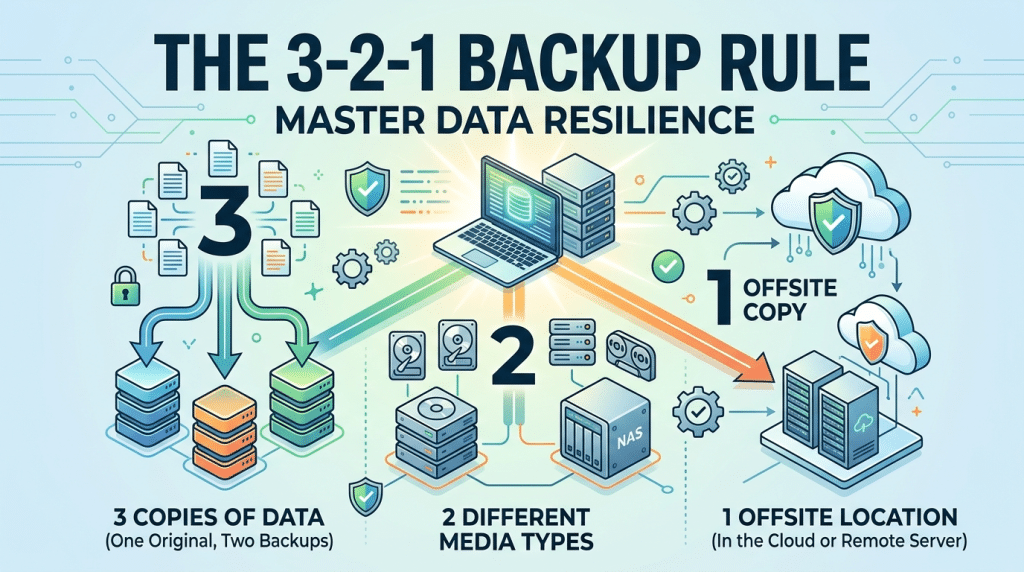
The 3-2-1 Backup Rule: The Golden Standard for Physical and Cloud Redundancy
Data loss is rarely a matter of if—it is almost always a matter of when. Whether caused by a sudden hardware breakdown, an severe weather event, accidental file deletion, or a sophisticated ransomware attack, losing access to critical business data can paralyze operations, destroy customer trust, and cost thousands of dollars per hour in downtime.
To protect against total operational failure, cybersecurity experts and managed service providers rely on a time-tested strategy known as the 3-2-1 Backup Rule. Originally developed to manage physical photo archives, this framework remains the universal golden standard for data redundancy in modern corporate environments.
What Is the 3-2-1 Backup Rule?
The 3-2-1 Backup Rule establishes a disciplined framework designed to eliminate single points of failure in your data protection architecture. The rule breaks down into three fundamental requirements:
3: Maintain Three Total Copies of Your Data
Your business should always have three copies of all essential files and systems: one primary production copy (the operational data on your servers or workstations) and at least two separate backup copies. Having multiple copies ensures that if one dataset becomes corrupted or compromised, you still have two independent layers of protection to pull from.
2: Use Two Different Types of Storage Media
Relying on a single type of technology creates a systemic vulnerability. If your primary files sit on a solid-state drive (SSD) and your backup lives on an identical external SSD, both devices remain susceptible to the exact same physical failures, firmware bugs, or power surges. Storing your backups across two distinct media types—such as local network-attached storage (NAS) and cloud object storage—ensures that a localized media defect does not wipe out every copy simultaneously.
1: Keep At Least One Copy Offsite
If all three copies of your data reside inside the same building, a physical disaster like a structural fire, severe pipe burst, or localized hurricane flooding will destroy your primary data and your local backups at the exact same time. Storing at least one copy in an offsite location—most commonly a secure cloud data center—guarantees geographic separation and protects your business against localized disasters.
Why the 3-2-1 Rule Matters for Small and Mid-Sized Businesses
Many business owners assume that simply using a local external drive or syncing files to a basic cloud folder is enough to stay protected. However, basic sync tools and single-location backups carry significant risks:
- Ransomware Spread: Automated cloud sync services often sync file changes instantly. If ransomware encrypts your local files, the encrypted versions are immediately pushed to the cloud, destroying both copies simultaneously.
- Physical Theft and Disasters: A physical break-in or severe storm can ruin on-site equipment, rendering local backups useless if no offsite copy exists.
- Operational Recovery Speed: While cloud backups provide offsite protection, restoring terabytes of data over the internet during an emergency can take days. Having a fast local NAS backup enables immediate local recovery while keeping the offsite cloud copy as a safety net.
Modernizing the Framework: The 3-2-1-1-0 Standard
While the core 3-2-1 framework remains essential, modern cyber threats—specifically targeted ransomware that actively seeks out and deletes backup repositories—have forced security standards to evolve. Today, enterprise environments and forward-thinking SMBs extend the rule into the 3-2-1-1-0 standard:
- 1 Immutable Copy: At least one offsite backup copy must be immutable or air-gapped. Immutable backups use write-once, read-many (WORM) technology or object lock settings, preventing anyone—including unauthorized users with stolen admin credentials—from altering, encrypting, or deleting the files for a specified retention period.
- 0 Unverified Restores: A backup that has never been tested is not a reliable backup. The “0” stands for zero errors during recovery, enforced through automated backup monitoring, integrity checks, and routine restoration drills.
Steps to Implement a Robust 3-2-1 Strategy
Building a resilient backup architecture requires strategic planning and ongoing management.
Audit and Classify Your Data
Identify your core operational assets, including customer databases, accounting records, proprietary files, and SaaS platform data. Determine your Recovery Time Objective (how quickly you must restore data) and Recovery Point Objective (how much data loss you can tolerate).
Automate and Encrypt
Manual backups fail when employees forget or skip procedures. Configure automated backup software to run on precise schedules. Ensure all backup data is encrypted both in transit over the network and at rest on storage media.
Enforce Role-Based Access and Multi-Factor Authentication
Restrict access to backup management consoles. Use dedicated credentials protected by multi-factor authentication (MFA) so that a compromise on a standard employee workstation does not grant attackers access to your backup repositories.
Partner with Managed IT Experts
Managing complex hybrid backup infrastructure, monitoring daily completion logs, and running recovery drills requires continuous technical oversight.
Secure Your Business Continuity with Krypto IT
A robust backup strategy is your ultimate insurance policy against cyber threats, hardware crashes, and unexpected operational disruptions. At Krypto IT, we help Houston businesses design, implement, and manage secure hybrid backup solutions aligned with the 3-2-1-1-0 standard.
From immutable cloud repositories to automated local recovery appliances, our team ensures your business data stays protected, verified, and rapidly recoverable when you need it most.
Is your business data fully protected against disaster? Contact Krypto IT today to schedule a backup and disaster recovery assessment.